An ordinary message
In your chat historyAnyone with access to the conversation contents can read the text and available attachments.
Encrypt a message or file on your device. Send it through your usual chat. Reading its contents requires the corresponding private key.
Access to an account, an unlocked device or saved chat history can expose messages. Secure Chat lets you send content to your messenger after it has been encrypted.
Anyone with access to the conversation contents can read the text and available attachments.
The history contains an encrypted container. Reading it requires a matching private key from the Secure Chat wallet.
An illustration, not a working encryption tool. The protection offered by a particular messenger depends on its mode and settings. Secure Chat adds separate content encryption; device security remains important.
Your contact also needs Secure Chat. No messaging server or account with our service is required.
Create profiles, exchange public cards and compare the full fingerprint in person or through an independent trusted channel.
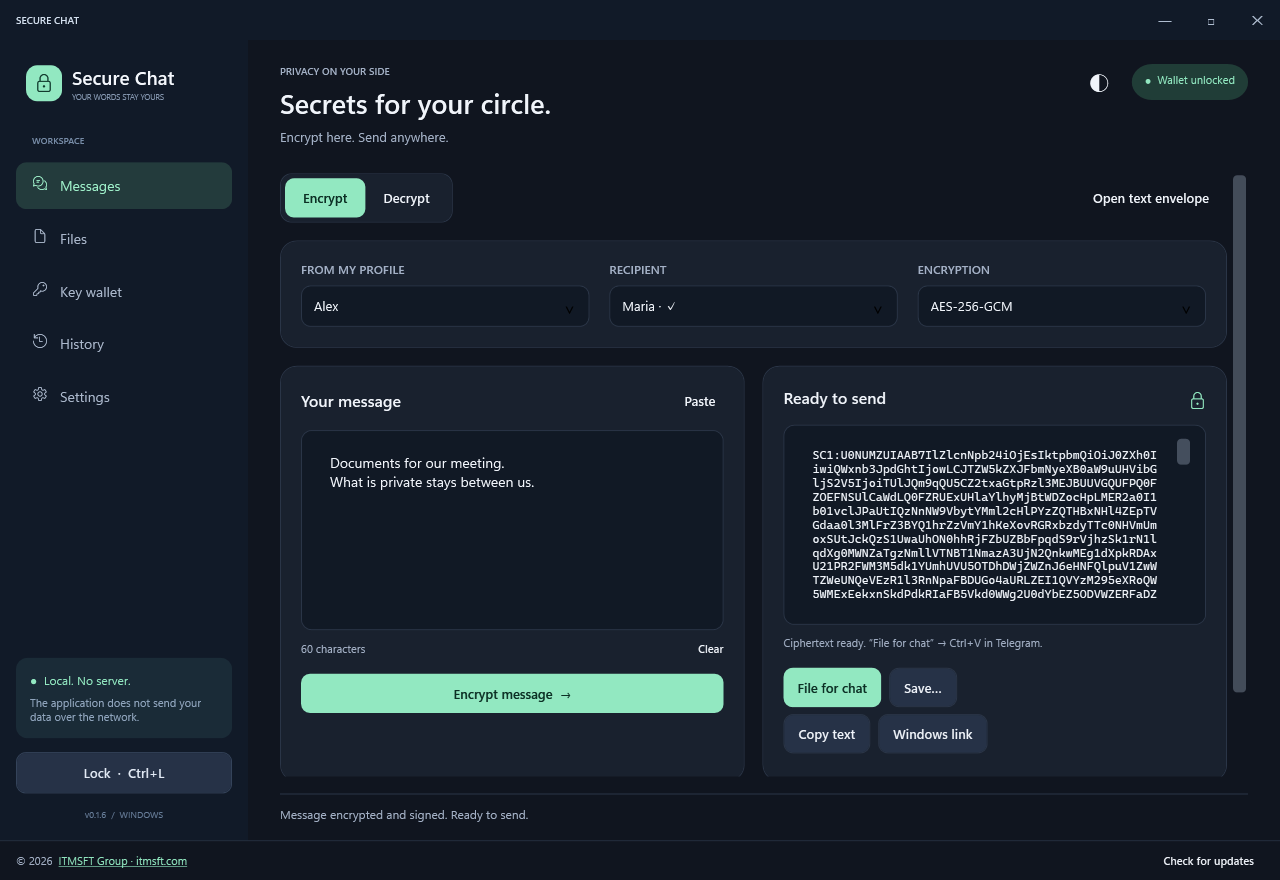
Choose a profile, recipient and algorithm. Your text or file is encrypted locally and signed with the sender's key.
“File for chat” copies the encrypted message. In Telegram, paste it with Ctrl+V and send the attachment.
The recipient opens the container with their key. The app verifies integrity and the signature; trust in the sender's identity depends on a verified fingerprint.
From a short message to a large file. With recipient selection, operation history and clear progress.
Enter text, choose a recipient and create a signed container. Copy the ciphertext or send it as a .scmsg file.
The app screens use demo profiles and data.
Standard .NET and operating system cryptographic primitives. Separate encryption and signing keys. A documented container format.
Full technical documentationNo independent audit has been performed yet. The scheme provides neither forward secrecy nor post-quantum protection. A compromised device can expose plaintext and keys. File names, file sizes and key information in the header are visible. All limitations →
A portable app. The EXE already includes .NET. Extract the archive into a writable folder and create your wallet.
macOS and Android are not supported in this release.
Keep the app in a writable folder.
Create a profile and a long, unique password of at least 12 characters.
The Data folder contains your wallet. Access cannot be restored without the private keys and password.
adf47654a3886240b868a1b05e087048c6e5617dc42513ecacd20049b5eacce9
The checksum helps verify integrity. It is not the publisher's digital signature.
Already using Secure Chat? Close the app and replace the EXE in the same folder. Keep Data unchanged. You can check for new versions in the app; automatic checks are enabled separately.
No. Secure Chat encrypts and decrypts content on your device. Use your usual messenger, email or another channel for delivery. The app has no separate chat or delivery server.
The sender clicks “File for chat”, pastes with Ctrl+V and sends the attachment. The recipient downloads the .scmsg file and opens it in Secure Chat. If the wallet is locked, the password is required first. Telegram does not make arbitrary securechat:// links clickable.
Files are processed in 1 MiB chunks, without loading the whole file into memory. The format limit is 1 TiB. Actual delivery limits depend on your channel, and processing time depends on your device and disk. The app displays the stage and overall percentage.
There is no server-based password recovery or reset. You need an accessible encrypted backup and its password. Older backups still open with their old password, even after changing the main wallet's password.
Encryption and decryption work locally. An update check sends a request to itmsft.com when you click the button or enable automatic checks. Messages, files, passwords and keys are not included in that request.
Use the form below to provide your contact and reason for access. Access terms are agreed separately with ITMSFT Group. Access is not granted automatically.
Source code for study, review or discussing deployment. Tell us why you need access and the ITMSFT Group team will review your request.
Do not use this form to send passwords, wallet keys, secret messages or confidential files.
Explore the system first